


Embedded Calculator Tool
Embedded Calculator Tool
The Embedded Calculator Tool is a Student Tool that gives teachers the option to provide students with a calculator within an assignment, removing the need for an external calculator. When selected, the Embedded Calculator Tool is available for use throughout an entire assignment.
- Select an assignment from Find & Assign.
- Click Assign to Class.
- On the second page, locate Embedded Calculator.
- Toggle the Embedded Calculator on.
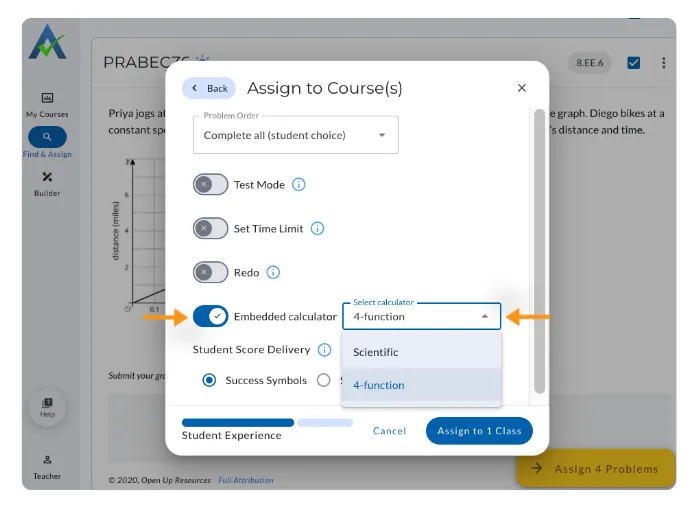
- Select the Calculator Type:
- 4-Function Calculator – Supports basic operations including addition, subtraction, multiplication, and division.
.gif)
- Scientific Calculator – Includes advanced functions such as logarithms, sine, cosine, tangent, roots, and exponents.
.gif)
6. Click ‘Assign’.
Thank you! Your submission has been received!
Oops! Something went wrong while submitting the form.
Embedded Calculator Tool
The Embedded Calculator Tool is a Student Tool that gives teachers the option to provide students with a calculator within an assignment, removing the need for an external calculator. When selected, the Embedded Calculator Tool is available for use throughout an entire assignment.
- Select an assignment from Find & Assign.
- Click Assign to Class.
- On the second page, locate Embedded Calculator.
- Toggle the Embedded Calculator on.
- Select the Calculator Type:
- 4-Function Calculator – Supports basic operations including addition, subtraction, multiplication, and division.
- Scientific Calculator – Includes advanced functions such as logarithms, sine, cosine, tangent, roots, and exponents.
6. Click ‘Assign’.
Thank you! Your submission has been received!
Oops! Something went wrong while submitting the form.
Didn't Find What You Were Looking For?
.avif)
The ASSISTments Foundation is a 501(c)(3) non-profit organization sponsored by Worcester Polytechnic Institute.
Charitable Number: 83-4228740
Charitable Number: 83-4228740


© 2026 ASSISTments. All rights reserved.