

Student Tutorial: Using the ASSISTments Student Home Page
Using the ASSISTments Student Homepage
The Student Home Page is an easy way to access ASSISTments Assignments after you have accessed an ASSISTments Assignment for the first time.
If you have not accessed an ASSISTments Assignment before, see Accessing an ASSISTments Assignment for the First Time.
How to Sign In
To open the Student Home Page:
- Go to student.assistments.org.
- Log in using your learning management credentials:
- Google Classroom
- Canvas
- All Other LMS
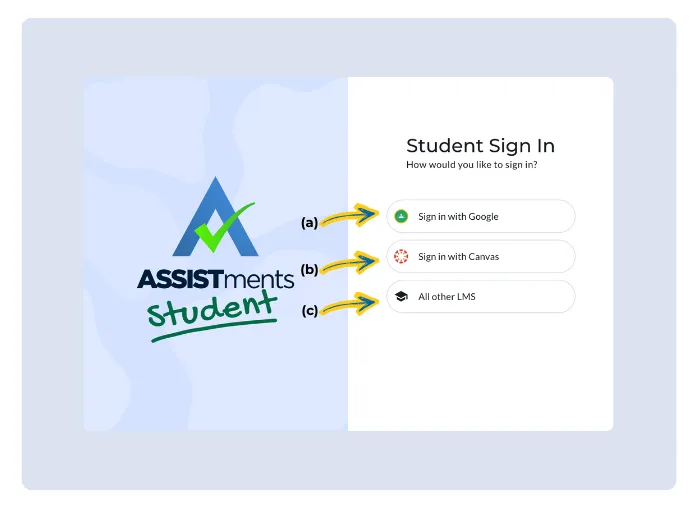
- Enter your information exactly as you would on your learning management system login page.
Once logged in, you will land on the My Assignments page with the Assigned tab selected.
What You See on the My Assignments Tab
The My Assignments tab shows ASSISTments Assignments you still need to work on.
You may see:
- Not Started ASSISTments Assignments
- In Progress ASSISTments Assignments
- Upcoming ASSISTments Assignments
- Overdue ASSISTments Assignments
%20-%202026-02-17T132705.032%20(1).gif)
ASSISTments Assignments appear as cards you can select.
Using Filters on the Student Home Page
On the My Assignments page, you can use filters to help find specific ASSISTments Assignments.
Filters allow you to view assignments by:
- Assignment type
- Skill Builders
- Test Mode
- Assignment status
- Not Started
- In Progress
- Overdue
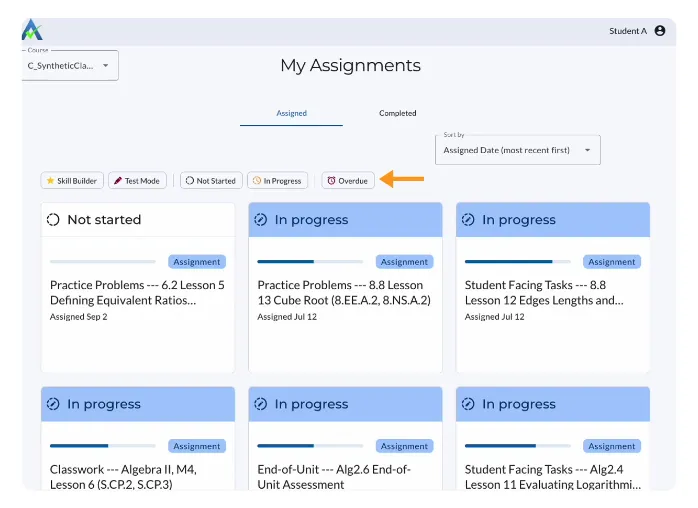
Selecting a filter updates the list of assignments shown on the page.
You can change or clear filters at any time to view all assignments again.
Choosing an Assignment to Work On
Always start with the ASSISTments Assignment your teacher has asked you to complete.
- Click the assignment card of the ASSISTments Assignment
- Select Start Assignment to begin
%20-%202026-02-17T132804.463%20(1).gif)
Checking Finished Assignments
To review completed work:
- Select the Completed tab on the Student Home Page.
- Choose an ASSISTments Assignment from the list.
%20(1).gif)
From the Completed tab, you can:
- View your score report, if available
- Review teacher comments on open-response questions.
- Teacher Feedback is available when you see the comment icon .
Getting Help
If you are unsure which ASSISTments Assignment to complete or what to review:
- Check the ASSISTments Assignment name and status.
- Contact your teacher for help.
Using the ASSISTments Student Homepage
The Student Home Page is an easy way to access ASSISTments Assignments after you have accessed an ASSISTments Assignment for the first time.
If you have not accessed an ASSISTments Assignment before, see Accessing an ASSISTments Assignment for the First Time.
How to Sign In
To open the Student Home Page:
- Go to student.assistments.org.
- Log in using your learning management credentials:
- Google Classroom
- Canvas
- All Other LMS
- Enter your information exactly as you would on your learning management system login page.
Once logged in, you will land on the My Assignments page with the Assigned tab selected.
What You See on the My Assignments Tab
The My Assignments tab shows ASSISTments Assignments you still need to work on.
You may see:
- Not Started ASSISTments Assignments
- In Progress ASSISTments Assignments
- Upcoming ASSISTments Assignments
- Overdue ASSISTments Assignments
ASSISTments Assignments appear as cards you can select.
Using Filters on the Student Home Page
On the My Assignments page, you can use filters to help find specific ASSISTments Assignments.
Filters allow you to view assignments by:
- Assignment type
- Skill Builders
- Test Mode
- Assignment status
- Not Started
- In Progress
- Overdue
Selecting a filter updates the list of assignments shown on the page.
You can change or clear filters at any time to view all assignments again.
Choosing an Assignment to Work On
Always start with the ASSISTments Assignment your teacher has asked you to complete.
- Click the assignment card of the ASSISTments Assignment
- Select Start Assignment to begin
Checking Finished Assignments
To review completed work:
- Select the Completed tab on the Student Home Page.
- Choose an ASSISTments Assignment from the list.
From the Completed tab, you can:
- View your score report, if available
- Review teacher comments on open-response questions.
- Teacher Feedback is available when you see the comment icon .
Getting Help
If you are unsure which ASSISTments Assignment to complete or what to review:
- Check the ASSISTments Assignment name and status.
- Contact your teacher for help.
Didn't Find What You Were Looking For?
.avif)
Charitable Number: 83-4228740


