


Student Details Report
Student Details Report
The Student Details Report provides an overview of every action taken by a student as they complete an assignment in ASSISTments. This includes time spent on each individual problem, the student's responses on a problem, and any feedback provided by the teacher on open-response problems.
Accessing the Student Details Report
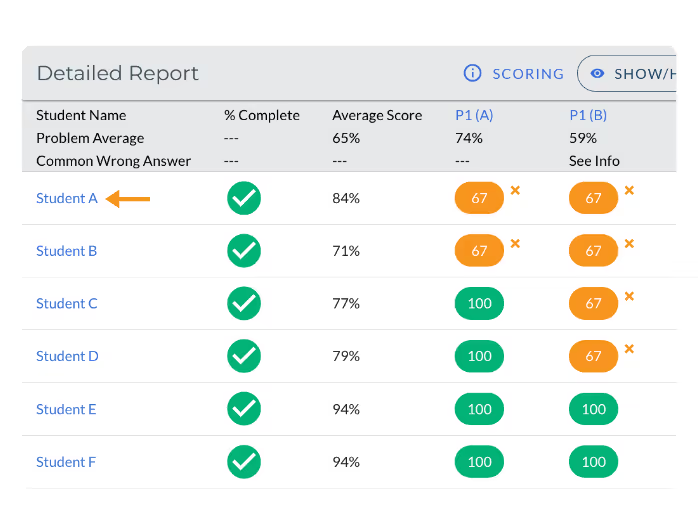
You can access the Student Details Report for a student by clicking their name in the Detailed Report section of an Assignment Report (see below).
Student Details Report Overview
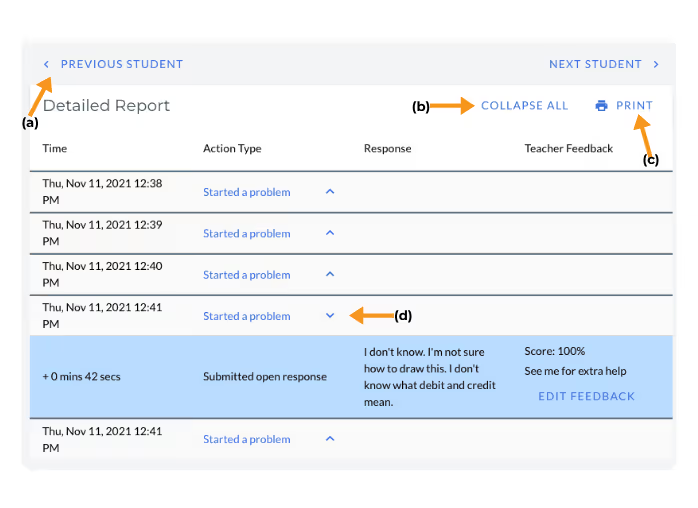
- a. Use the ‘Previous Student’ and ‘Next Student’ to toggle between the Student Details Report for each student in the class for this assignment.
- b. Choose ‘Expand All’ to expand all problem rows. Clicking ‘Expand All’ will show all student actions and the time spent for each problem.Choose the option to ‘Collapse All’ to collapse all problem rows.
- c. Click Print to generate a printable copy of the Student Details Report
- d. Click the arrow within any problem row to expand or collapse that individual row.
Student Details Report
The Student Details Report provides an overview of every action taken by a student as they complete an assignment in ASSISTments. This includes time spent on each individual problem, the student's responses on a problem, and any feedback provided by the teacher on open-response problems.
Accessing the Student Details Report
You can access the Student Details Report for a student by clicking their name in the Detailed Report section of an Assignment Report (see below).
Student Details Report Overview
- a. Use the ‘Previous Student’ and ‘Next Student’ to toggle between the Student Details Report for each student in the class for this assignment.
- b. Choose ‘Expand All’ to expand all problem rows. Clicking ‘Expand All’ will show all student actions and the time spent for each problem.Choose the option to ‘Collapse All’ to collapse all problem rows.
- c. Click Print to generate a printable copy of the Student Details Report
- d. Click the arrow within any problem row to expand or collapse that individual row.
Didn't Find What You Were Looking For?
.avif)
Charitable Number: 83-4228740


