


Key Settings
Key Settings in ASSISTments
Teachers can customize essential classroom settings in ASSISTments through Key Settings.
From this area, teachers can:
- Manage feature settings such as Test Mode, Student Supports, and Student Score Delivery.
- Import or sync classes connected to their LMS (Google Classroom, Canvas, Schoology, etc.)
Accessing Feature Settings
Feature Settings allow teachers to manage assignment options and student experiences.
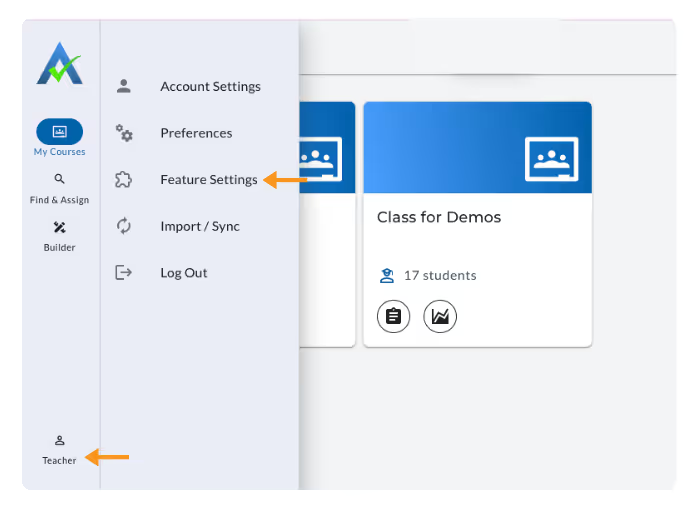
- Click your name in the lower left-hand corner of ASSISTments.
- Select Feature Settings to open your options.
Import/Sync
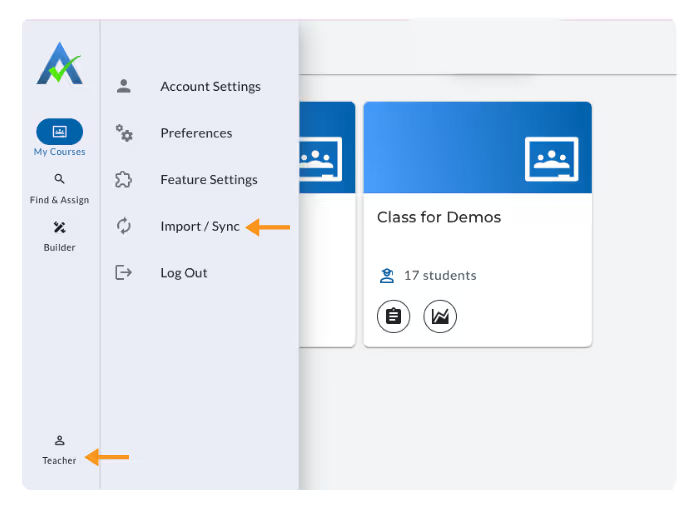
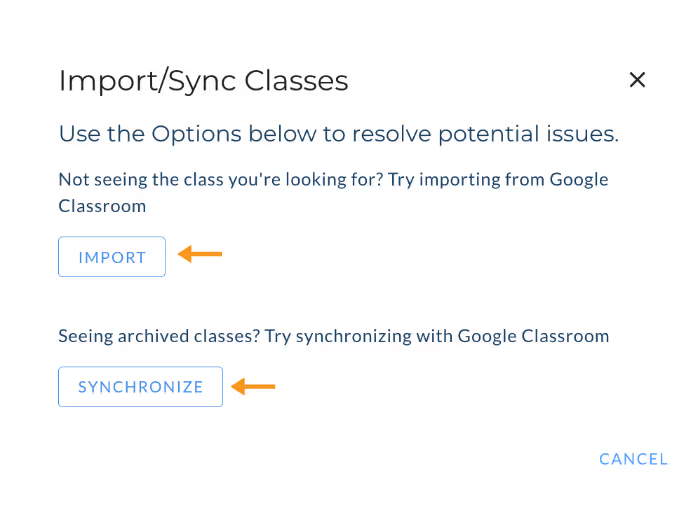
The Import/Sync option allows you to import new classes or synchronize existing classes
- Import Classes – Add new classes from your connected LMS (Google Classroom, Canvas, Schoology, etc.)
- Synchronize Classes – Update rosters to reflect LMS changes or remove archived classes.
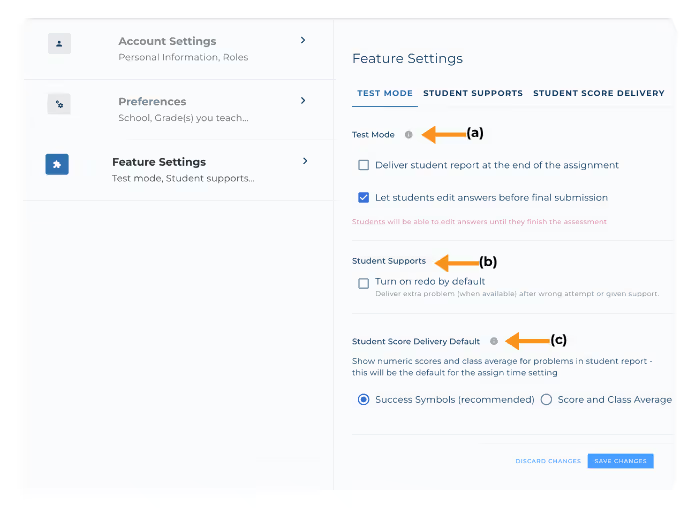
Available settings include:
- a. Test Mode
- b. Student Supports
- c. Student Score Delivery Default
Note: If you modify any Key Settings, be sure to click Save Changes before exiting the Feature Settings page.
Test Mode
Test Mode allows you to control how assignments in Test Mode function for students.
- Deliver student report at the end of the assignment.
- Students receive their score report after submitting their assessment.
- Let students edit answers before final submission (default).
Note: These options can also be adjusted at the Assign Time options when creating or editing assignments.
Student Supports
Student Supports settings let you control the Redo options students have while completing assignments.
- Turn on redo by default.
- Delivers additional problem (when available) after wrong attempt or student support utilized (ex. Hints).
Student Score Delivery Default
This setting determines how students see their results after submitting their assignments.
Choose between:
- Success Symbols (Recommended).
- Score and Class Average– Students can view both their individual score and the class average for each problem.
Learn more about the Student Report here.
Key Settings in ASSISTments
Teachers can customize essential classroom settings in ASSISTments through Key Settings.
From this area, teachers can:
- Manage feature settings such as Test Mode, Student Supports, and Student Score Delivery.
- Import or sync classes connected to their LMS (Google Classroom, Canvas, Schoology, etc.)
Accessing Feature Settings
Feature Settings allow teachers to manage assignment options and student experiences.
- Click your name in the lower left-hand corner of ASSISTments.
- Select Feature Settings to open your options.
Import/Sync
The Import/Sync option allows you to import new classes or synchronize existing classes
- Import Classes – Add new classes from your connected LMS (Google Classroom, Canvas, Schoology, etc.)
- Synchronize Classes – Update rosters to reflect LMS changes or remove archived classes.
Available settings include:
- a. Test Mode
- b. Student Supports
- c. Student Score Delivery Default
Note: If you modify any Key Settings, be sure to click Save Changes before exiting the Feature Settings page.
Test Mode
Test Mode allows you to control how assignments in Test Mode function for students.
- Deliver student report at the end of the assignment.
- Students receive their score report after submitting their assessment.
- Let students edit answers before final submission (default).
Note: These options can also be adjusted at the Assign Time options when creating or editing assignments.
Student Supports
Student Supports settings let you control the Redo options students have while completing assignments.
- Turn on redo by default.
- Delivers additional problem (when available) after wrong attempt or student support utilized (ex. Hints).
Student Score Delivery Default
This setting determines how students see their results after submitting their assignments.
Choose between:
- Success Symbols (Recommended).
- Score and Class Average– Students can view both their individual score and the class average for each problem.
Learn more about the Student Report here.
Didn't Find What You Were Looking For?
.avif)
Charitable Number: 83-4228740


