


Getting Started with ASSISTments for Google Administrators
Getting Started with ASSISTments for Google Administrators
Once your school and/or district has approved the use of ASSISTments, Google Administrators must approve ASSISTments as a third-party vendor in Google Workspace for Education.
Information on how to approve third-party vendors can be found on Google’s support site by visiting this help center and following the directions under "Configure access for requested third-party apps". Once completed, confirm access to ASSISTments.
Once approval is complete, no further action is required from Google Administrators.
What to Do If You Do Not See ASSISTments Pending as a Third-Party App
If ASSISTments does not appear as a pending third-party app in Google Workspace for Education, follow the instructions below:
- Visit the ASSISTments website and select Teacher Sign Up to create an account.
- Once your account is created, ASSISTments should appear as a pending third-party app.
- Follow the instructions in Google's Help Center under Configure access for requested third-party apps to approve ASSISTments.
- Once approval is complete, confirm access to ASSISTments.
Note: Once ASSISTments is approved, no further action is required from Google Administrators.
What Happens If I Don’t Approve ASSISTments?
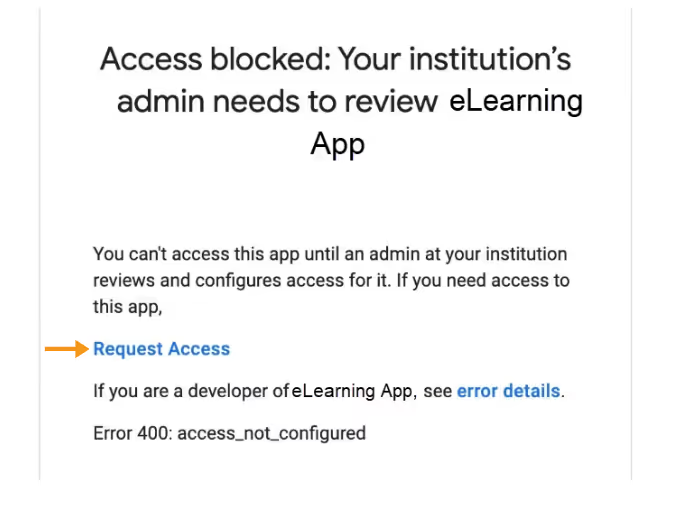
If ASSISTments is not approved, students will receive an error message when attempting to access ASSISTments assignments through Google Classroom.
Get in contact with ASSISTments
If there are additional questions or technical issues related to the Google approval process, please contact us at contact@assistments.org.
Getting Started with ASSISTments for Google Administrators
Once your school and/or district has approved the use of ASSISTments, Google Administrators must approve ASSISTments as a third-party vendor in Google Workspace for Education.
Information on how to approve third-party vendors can be found on Google’s support site by visiting this help center and following the directions under "Configure access for requested third-party apps". Once completed, confirm access to ASSISTments.
Once approval is complete, no further action is required from Google Administrators.
What to Do If You Do Not See ASSISTments Pending as a Third-Party App
If ASSISTments does not appear as a pending third-party app in Google Workspace for Education, follow the instructions below:
- Visit the ASSISTments website and select Teacher Sign Up to create an account.
- Once your account is created, ASSISTments should appear as a pending third-party app.
- Follow the instructions in Google's Help Center under Configure access for requested third-party apps to approve ASSISTments.
- Once approval is complete, confirm access to ASSISTments.
Note: Once ASSISTments is approved, no further action is required from Google Administrators.
What Happens If I Don’t Approve ASSISTments?
If ASSISTments is not approved, students will receive an error message when attempting to access ASSISTments assignments through Google Classroom.
Get in contact with ASSISTments
If there are additional questions or technical issues related to the Google approval process, please contact us at contact@assistments.org.
Didn't Find What You Were Looking For?
.avif)
Charitable Number: 83-4228740


