


Create a Free Account with Google Classroom
Create an Account with Google Classroom
These are the steps to get started with ASSISTments in Google Classroom. Follow the directions below to create your account, verify your teacher role, and ensure you’re ready to begin assigning work to your students.
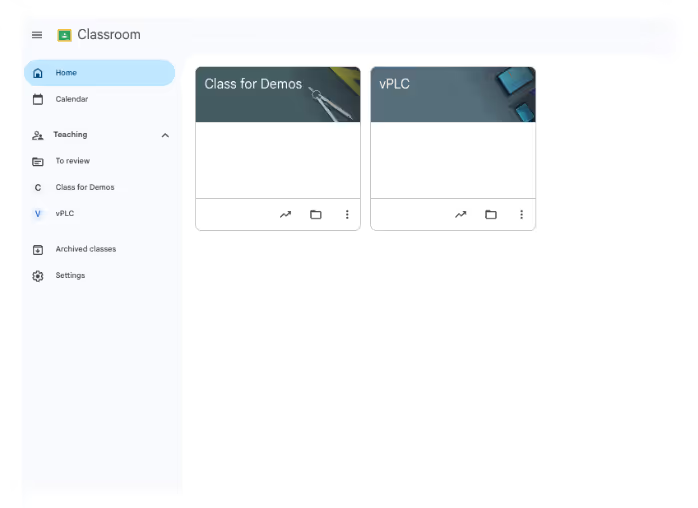
Note: Before creating an account with ASSISTments, make sure you’ve already set up your Google Classroom class. If you haven’t, follow the setup instructions from Google.
Sign Up for ASSISTments
- Go to www.assistments.org
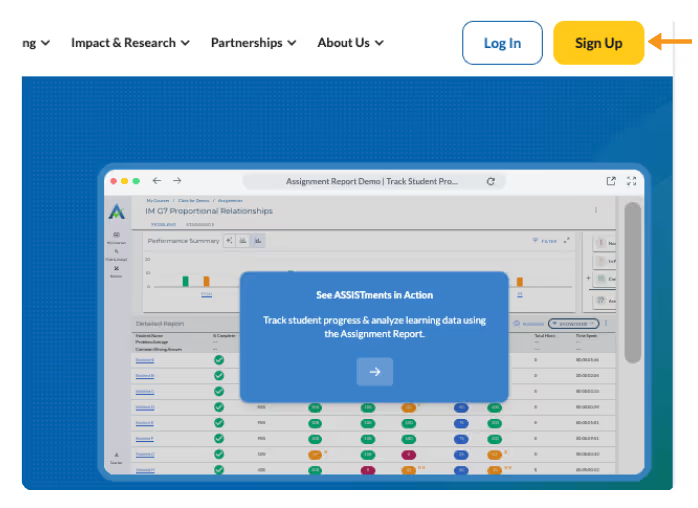
- Select “Sign Up”
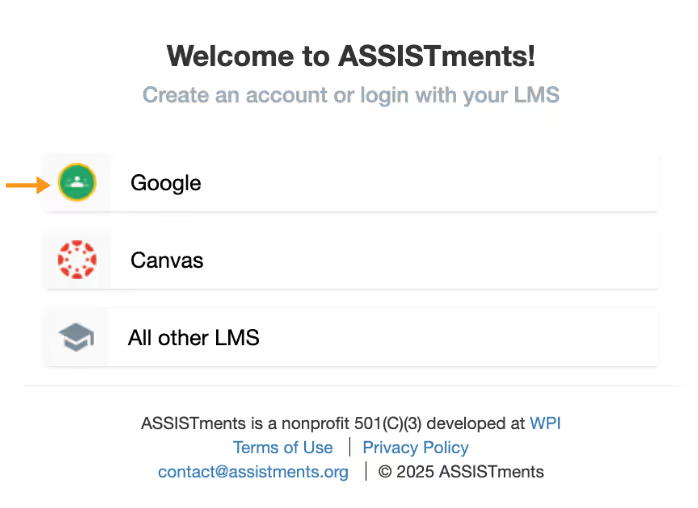
- Select “Google”
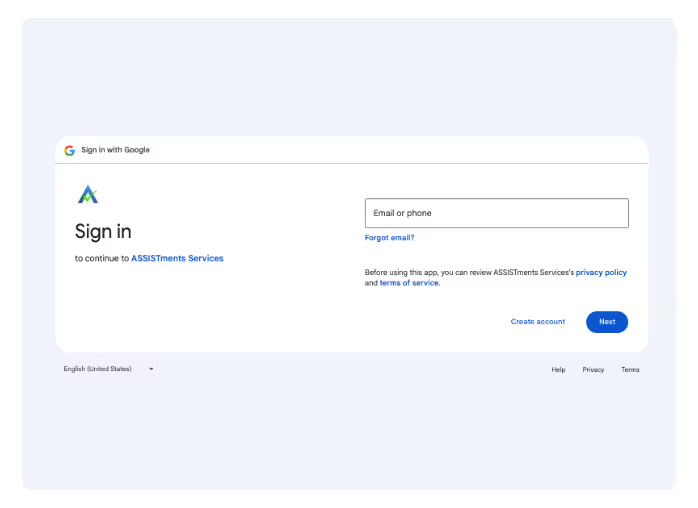
4. Log in using the email address associated with your Google Classroom account.
5. Click “Create a new account”
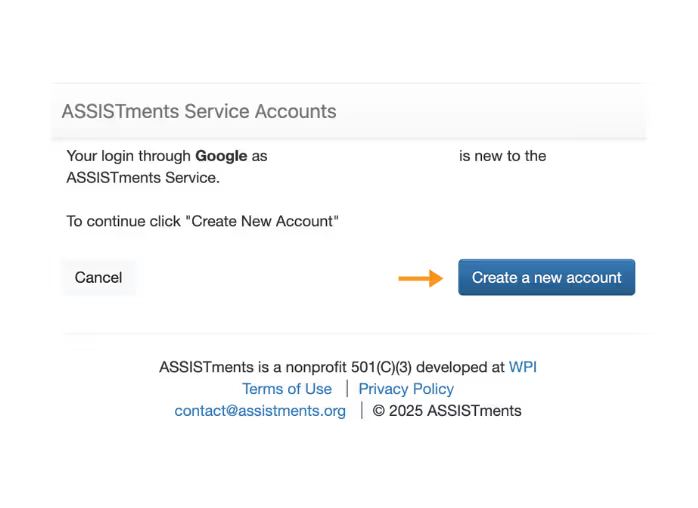
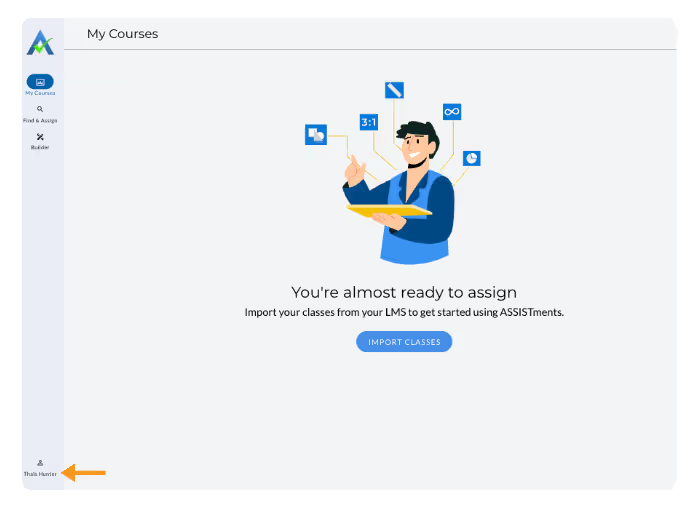
6. Once that is created, you will see your name in the bottom left corner of the page.
Verify Teacher Role
- Click your name in the bottom left corner and select Account Settings
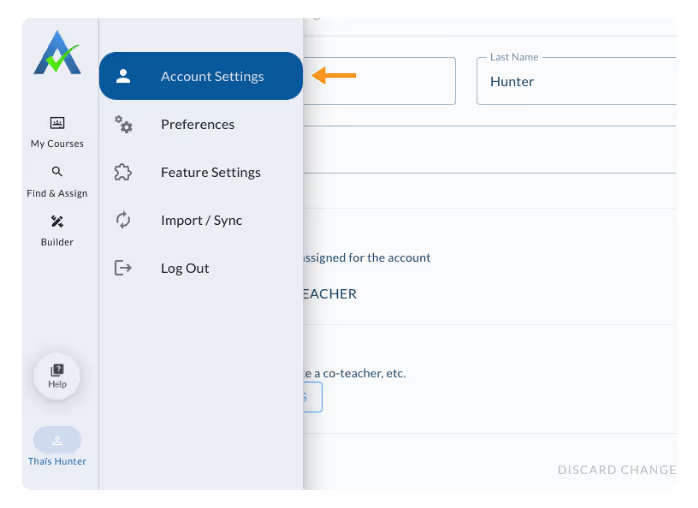
- In the Account Settings tab, confirm that Teacher is listed under User Roles.
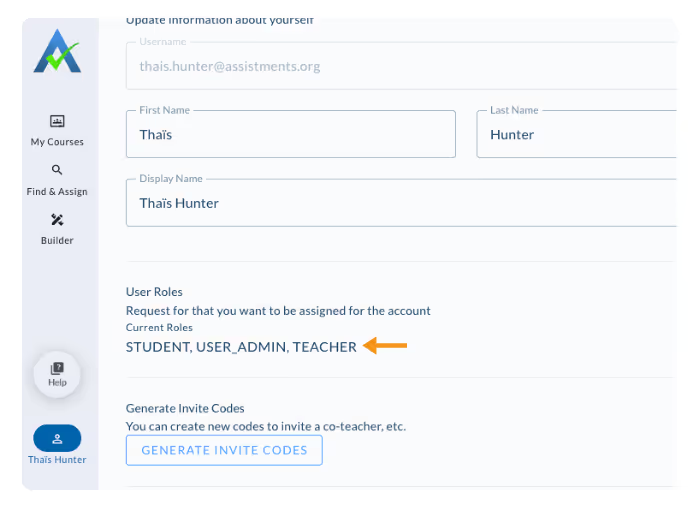
If your school’s Google Workspace administrator has already provided you with a teacher role, sign-up and verification happen automatically when you import your class —no additional steps are needed.
Note: Your Google Administrator will need to approve ASSISTments as a third-party app in order for teachers and students to assign and access ASSISTments. You can learn more about this process here.
If You Don’t See “Teacher” Under User Roles
- Check your account.
- Log out of ASSISTments and sign back in using the correct Google Classroom account.
- Have another teacher verify you.
- A colleague with ‘Teacher’ under their User Roles can invite you to join ASSISTments
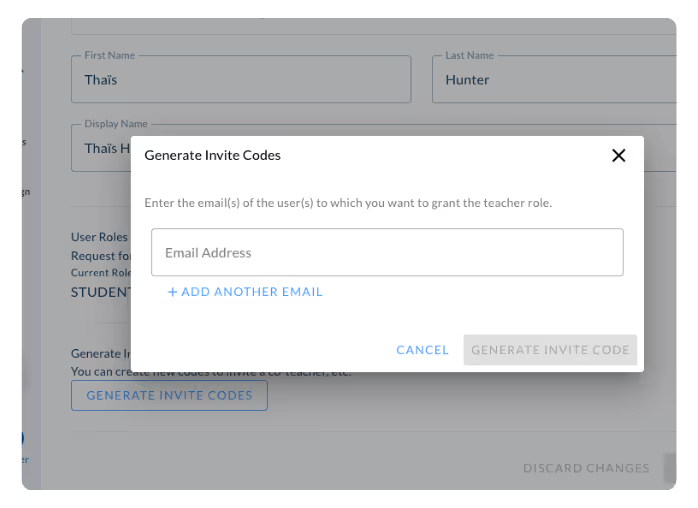
- They can go to Account Settings → Beneath User Roles → Generate Invite Codes, click Generate Invite Codes → Enter your email address → Click Generate Invite Code.
- They will need to share this code with you. Once you have this code, click “How to Get a Teacher Role?” and type that invite code in where indicated.
- A colleague with ‘Teacher’ under their User Roles can invite you to join ASSISTments
- Contact ASSISTments Support.
- If none of the above options work, email contact@assistments.org and include one of the following for verification:
- A picture of your school ID
- A link to your staff page on the school website
- Another form of proof showing you are a teacher
- If none of the above options work, email contact@assistments.org and include one of the following for verification:
Once your account shows a verified Teacher role, you’ll be ready to begin creating and assigning work through ASSISTments. Learn to Create Your First Assignment here.
Create an Account with Google Classroom
These are the steps to get started with ASSISTments in Google Classroom. Follow the directions below to create your account, verify your teacher role, and ensure you’re ready to begin assigning work to your students.
Note: Before creating an account with ASSISTments, make sure you’ve already set up your Google Classroom class. If you haven’t, follow the setup instructions from Google.
Sign Up for ASSISTments
- Go to www.assistments.org
- Select “Sign Up”
- Select “Google”
4. Log in using the email address associated with your Google Classroom account.
5. Click “Create a new account”
6. Once that is created, you will see your name in the bottom left corner of the page.
Verify Teacher Role
- Click your name in the bottom left corner and select Account Settings
- In the Account Settings tab, confirm that Teacher is listed under User Roles.
If your school’s Google Workspace administrator has already provided you with a teacher role, sign-up and verification happen automatically when you import your class —no additional steps are needed.
Note: Your Google Administrator will need to approve ASSISTments as a third-party app in order for teachers and students to assign and access ASSISTments. You can learn more about this process here.
If You Don’t See “Teacher” Under User Roles
- Check your account.
- Log out of ASSISTments and sign back in using the correct Google Classroom account.
- Have another teacher verify you.
- A colleague with ‘Teacher’ under their User Roles can invite you to join ASSISTments
- They can go to Account Settings → Beneath User Roles → Generate Invite Codes, click Generate Invite Codes → Enter your email address → Click Generate Invite Code.
- They will need to share this code with you. Once you have this code, click “How to Get a Teacher Role?” and type that invite code in where indicated.
- A colleague with ‘Teacher’ under their User Roles can invite you to join ASSISTments
- Contact ASSISTments Support.
- If none of the above options work, email contact@assistments.org and include one of the following for verification:
- A picture of your school ID
- A link to your staff page on the school website
- Another form of proof showing you are a teacher
- If none of the above options work, email contact@assistments.org and include one of the following for verification:
Once your account shows a verified Teacher role, you’ll be ready to begin creating and assigning work through ASSISTments. Learn to Create Your First Assignment here.
Didn't Find What You Were Looking For?
.avif)
Charitable Number: 83-4228740


