


AIDA (AI-Generated Summary Report): ASSISTments Plus Feature
AIDA: AI-Generated Report Summary
⭐️ ASSISTments Plus Feature
This feature is available exclusively with ASSISTments Plus for Schools & Districts. Learn more here.
The AI-Generated Report Summary provides an overview of student performance on an assignment, including learning gaps, students to note, and recommendations.
Generate an AI-Generated Summary Report
- Open an Assignment Report.
- Select the AI-Generated Summary icon.
The AI-Generated Report Summary automatically generates when one student has completed at least one problem.
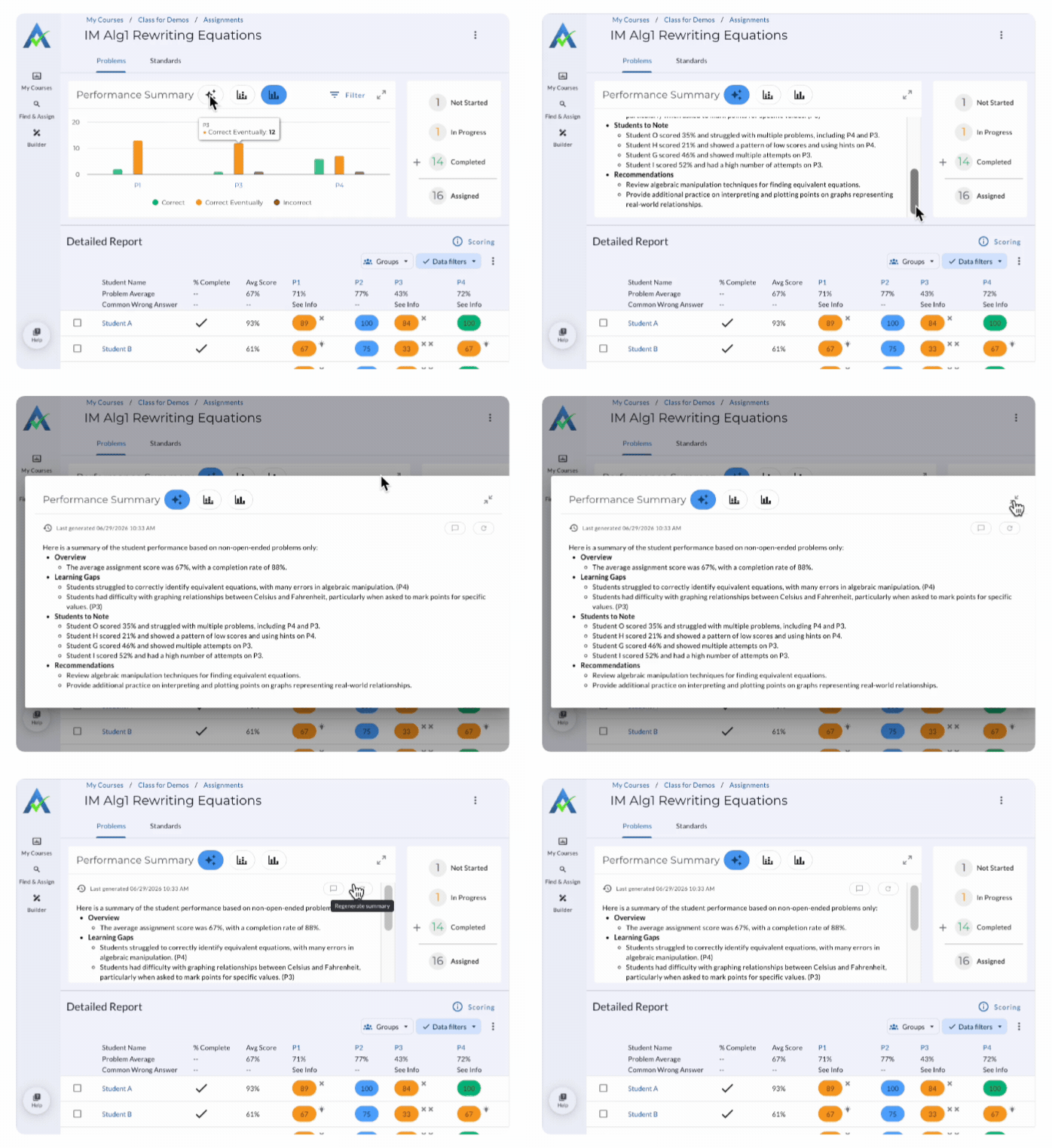
The summary includes:
Overview
View information about student performance, including the average assignment score and completion rate.
Learning Gaps
View insights into concepts students struggled with and the related problem number.
Students to Note
View insights into students to note based on assignment performance.
Recommendations
View recommendations for math concepts to review and/or provide additional practice.
AIDA: AI-Generated Report Summary
⭐️ ASSISTments Plus Feature
This feature is available exclusively with ASSISTments Plus for Schools & Districts. Learn more here.
The AI-Generated Report Summary provides an overview of student performance on an assignment, including learning gaps, students to note, and recommendations.
Generate an AI-Generated Summary Report
- Open an Assignment Report.
- Select the AI-Generated Summary icon.
The AI-Generated Report Summary automatically generates when one student has completed at least one problem.
The summary includes:
Overview
View information about student performance, including the average assignment score and completion rate.
Learning Gaps
View insights into concepts students struggled with and the related problem number.
Students to Note
View insights into students to note based on assignment performance.
Recommendations
View recommendations for math concepts to review and/or provide additional practice.
Didn't Find What You Were Looking For?
.avif)
Charitable Number: 83-4228740


