


State Standards
Change Your Content Standards
This guide explains how to change your selected content standards in ASSISTments and what you'll see when browsing standards-aligned problems.
You will have the option to choose state-specific standards, Common Core standards, or ASSISTments Skills. ASSISTments Skills are unpacked Common Core standards broken down into focused skills—to offer targeted practice and data reporting that supports student learning and growth.
Note on State Standards availability:
ASSISTments is adding state standards on a rolling basis. If you don't see your state's standards yet, check back soon—we're continually expanding coverage.
Change Your Content Standards
- Log in to your ASSISTments account.
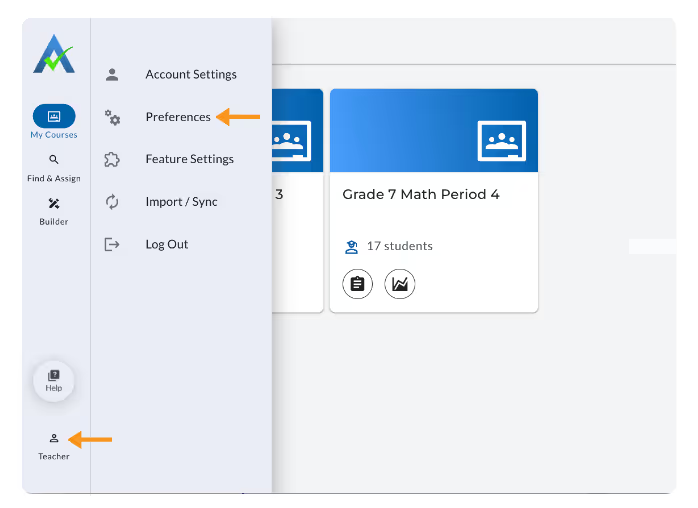
- Click your name in the bottom left corner.
- Select Preferences from the menu.
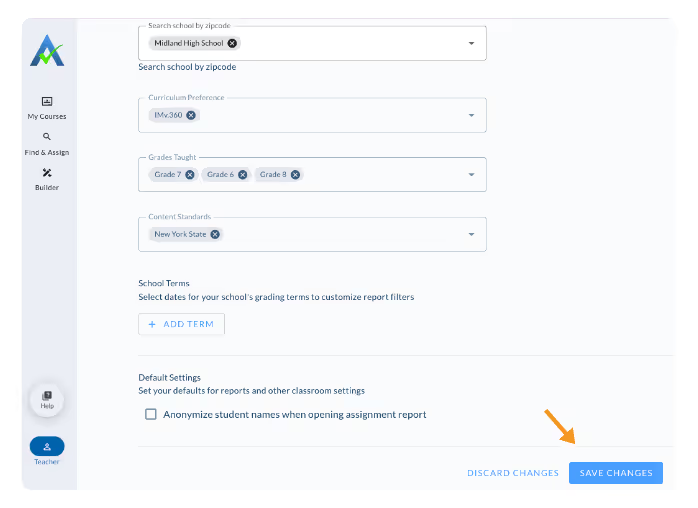
- In the Content Standards section, select your desired standards set.
%20(42).avif)
- Click Save.
Changes of Content Standards:
Tagged Problems by Updated Standards
Once you update your content standards, the problems in Find and Assign will be displayed in your content standards selection. For example, if you select New York State Standards, all problems will be tagged with the corresponding New York State Standards codes, making it easy to see exactly how each problem aligns.
%20(29).gif)
Search by Updated Standards
After updating your content standards, you can search the content library for problems aligned with your chosen content standard. For example, choosing New York State Standards as your content standard lets you search directly for content aligned to specific New York State Standards, so you can confidently find and assign the right material for your classroom.
%20(30).gif)
Updated Standards in Assignment Report
Your assignment reports will display the standard codes for the content standards you selected. This means that you’ll see student performance reported by New York State Standards if New York was selected as your content standard.
%20(28).gif)
Change Your Content Standards
This guide explains how to change your selected content standards in ASSISTments and what you'll see when browsing standards-aligned problems.
You will have the option to choose state-specific standards, Common Core standards, or ASSISTments Skills. ASSISTments Skills are unpacked Common Core standards broken down into focused skills—to offer targeted practice and data reporting that supports student learning and growth.
Note on State Standards availability:
ASSISTments is adding state standards on a rolling basis. If you don't see your state's standards yet, check back soon—we're continually expanding coverage.
Change Your Content Standards
- Log in to your ASSISTments account.
- Click your name in the bottom left corner.
- Select Preferences from the menu.
- In the Content Standards section, select your desired standards set.
- Click Save.
Changes of Content Standards:
Tagged Problems by Updated Standards
Once you update your content standards, the problems in Find and Assign will be displayed in your content standards selection. For example, if you select New York State Standards, all problems will be tagged with the corresponding New York State Standards codes, making it easy to see exactly how each problem aligns.
Search by Updated Standards
After updating your content standards, you can search the content library for problems aligned with your chosen content standard. For example, choosing New York State Standards as your content standard lets you search directly for content aligned to specific New York State Standards, so you can confidently find and assign the right material for your classroom.
Updated Standards in Assignment Report
Your assignment reports will display the standard codes for the content standards you selected. This means that you’ll see student performance reported by New York State Standards if New York was selected as your content standard.
Didn't Find What You Were Looking For?
.avif)
Charitable Number: 83-4228740


