

Companion Assignments: ASSISTments Plus
Companion Assignments
⭐️ ASSISTments Plus Feature
This feature is available exclusively with ASSISTments Plus for Schools & Districts. Learn more here.
Companion Assignments are fully auto-scored assignments aligned to the Illustrative Mathematics (IM) curriculum, currently available for middle school grades 6–8. They provide additional curriculum-aligned practice while giving teachers auto-scored results to help understand student performance.
Teachers can assign Companion Assignments to an entire class, a small group, or individual students based on their instructional needs.
Teachers can assign Companion Assignments to an entire class, a small group, or individual students based on their instructional needs.
Accessing Companion Assignments
- Go to Find to Assign.
- Select the Illustrative Mathematics curriculum used by your school or district.
- Select your grade level and navigate to the lesson you would like to assign.
- When Companion Practice is available for the selected lesson, select the Companion Practice assignment.
- Select Assign.
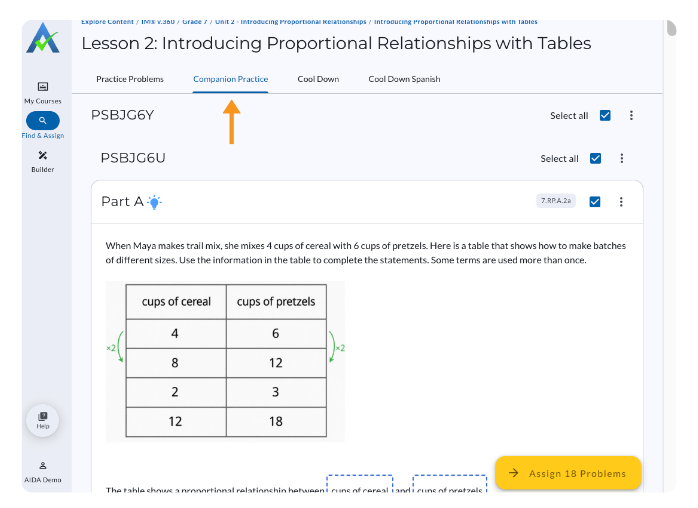
Understanding Companion Assignments
Companion Assignments are created by experienced curriculum developers who study each Illustrative Mathematics lesson’s mathematical focus, representations, strategies, and progression. The additional problems and instructionally aligned hints are designed to reflect:
- The mathematical focus of the individual lesson
- A coherent progression of complexity
- The reasoning and representations students are expected to use
- The specific strategies emphasized by Illustrative Mathematics authors
Teachers can use Companion Assignments after instruction for additional practice, or when students need another opportunity to work with the lesson content.
Companion Assignments support reteaching or differentiated instruction while keeping additional practice connected to the Illustrative Mathematics curriculum.
Companion Assignments
⭐️ ASSISTments Plus Feature
This feature is available exclusively with ASSISTments Plus for Schools & Districts. Learn more here.
Companion Assignments are fully auto-scored assignments aligned to the Illustrative Mathematics (IM) curriculum, currently available for middle school grades 6–8. They provide additional curriculum-aligned practice while giving teachers auto-scored results to help understand student performance.
Teachers can assign Companion Assignments to an entire class, a small group, or individual students based on their instructional needs.
Teachers can assign Companion Assignments to an entire class, a small group, or individual students based on their instructional needs.
Accessing Companion Assignments
- Go to Find to Assign.
- Select the Illustrative Mathematics curriculum used by your school or district.
- Select your grade level and navigate to the lesson you would like to assign.
- When Companion Practice is available for the selected lesson, select the Companion Practice assignment.
- Select Assign.
Understanding Companion Assignments
Companion Assignments are created by experienced curriculum developers who study each Illustrative Mathematics lesson’s mathematical focus, representations, strategies, and progression. The additional problems and instructionally aligned hints are designed to reflect:
- The mathematical focus of the individual lesson
- A coherent progression of complexity
- The reasoning and representations students are expected to use
- The specific strategies emphasized by Illustrative Mathematics authors
Teachers can use Companion Assignments after instruction for additional practice, or when students need another opportunity to work with the lesson content.
Companion Assignments support reteaching or differentiated instruction while keeping additional practice connected to the Illustrative Mathematics curriculum.
Didn't Find What You Were Looking For?
.avif)
Charitable Number: 83-4228740


