No items found.


Can I print a problem set or assignment directly from ASSISTments?
Can I print a problem set or assignment directly from ASSISTments?
Yes, you can print assignments or problem sets directly from ASSISTments.
- Select the My Assignments icon
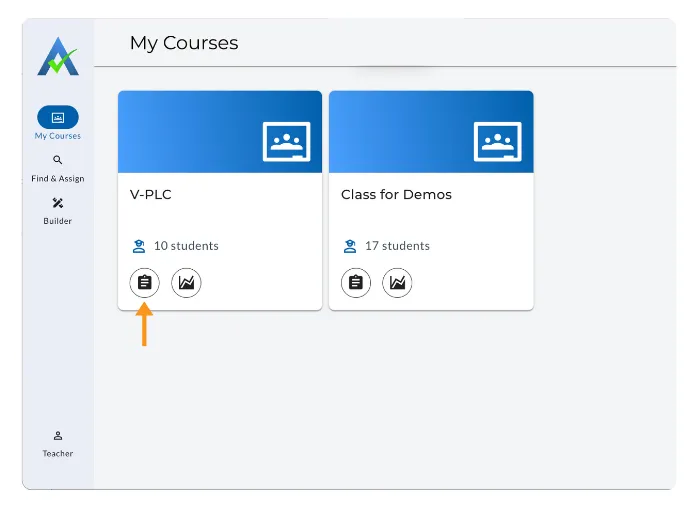
- Select the triple dots (⫶) to the assignment you want to print.
- Select Print Assignment
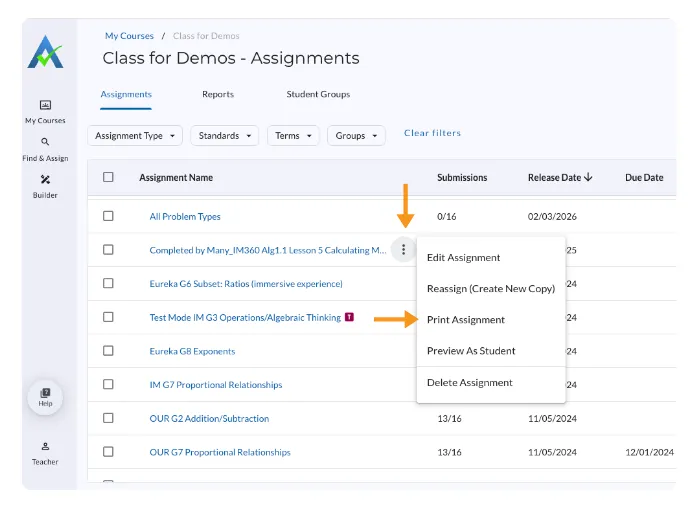
- Once you select Print Assignment, a print preview screen opens.
- Select Print.
Thank you! Your submission has been received!
Oops! Something went wrong while submitting the form.
Can I print a problem set or assignment directly from ASSISTments?
Yes, you can print assignments or problem sets directly from ASSISTments.
- Select the My Assignments icon
- Select the triple dots (⫶) to the assignment you want to print.
- Select Print Assignment
- Once you select Print Assignment, a print preview screen opens.
- Select Print.
Thank you! Your submission has been received!
Oops! Something went wrong while submitting the form.
Didn't Find What You Were Looking For?
.avif)
The ASSISTments Foundation is a 501(c)(3) non-profit organization sponsored by Worcester Polytechnic Institute.
Charitable Number: 83-4228740
Charitable Number: 83-4228740


© 2026 ASSISTments. All rights reserved.